Text input
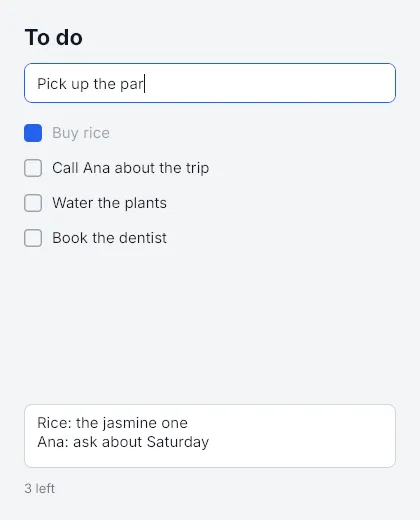
<Input>
Section titled “<Input>”import { Input, createSignal } from "mantou-ui";
const [draft, setDraft] = createSignal("");
<Input value={draft()} onChange={setDraft} onSubmit={(text) => { send(text); setDraft(""); }} placeholder="Write a message" style={{ height: 36, paddingLeft: 10, borderWidth: 1, borderColor: "#d1d5db", borderRadius: 8, fontSize: 15 }}/>| Prop | |
|---|---|
value + onChange |
Controlled: the text follows the signal. If the app changes what the user typed (uppercasing, say), the input shows the app’s text; if the app doesn’t update the signal at all, the input goes back to it |
defaultValue |
Uncontrolled: the text it starts with; the core keeps it from then on, and onChange still reports every change |
onSubmit |
Enter in a single-line input, Ctrl+Enter (⌘+Enter on macOS) in a multiline one |
onFocus, onBlur |
The keyboard focus came or went (by a press, Tab, node.focus(), node.blur(), or a press elsewhere) |
placeholder |
Shown while it’s empty, in placeholderColor (default: the text colour at 40%) |
multiline |
Enter adds a line; the input grows with its text unless its height is set |
maxLength, readOnly |
Checked in the core, so no keystroke has to wait for JS to be refused. Read-only text can still be selected and copied |
autoFocus |
Focus it when it’s created |
style |
A <View>’s box properties and a <Text>’s text properties, plus caretColor and selectionColor |
Without a width from its style or its parent, an input is 200 px wide (like a browser’s), and it has no minimum width, so it shrinks in a row. A single-line input is one line tall plus its padding, with its text centred vertically.
The Node behind it has focus(), blur(), focused, value (the text as the core last reported it), setValue(), placeholder() and setOptions(), for code that uses the node tree directly.
Editing
Section titled “Editing”The core does all of it, on the main thread for the window, without a round trip through JS:
- Caret and selection: arrows, Home and End, Shift to select; word by word with Alt (macOS) or Ctrl; line start and end with ⌘ on macOS; Up and Down between lines of a multiline input. Press to place the caret, drag to select, double-press for a word, triple-press for the line, Shift+press to extend.
- Deleting: Backspace and Delete, a word at a time with Alt (macOS) or Ctrl, to the line’s start with ⌘+Backspace on macOS.
- Shortcuts: select all, copy, cut, paste, undo and redo, with ⌘ on macOS and Ctrl elsewhere (also Ctrl+Y to redo). Typing is grouped into one undo step per word. The window uses the system clipboard (X11 on Linux, so XWayland on Wayland); each headless instance has its own.
- IME: compositions are drawn in place, underlined, and only become the value when the IME commits them. The IME’s candidate window is placed at the caret.
- Focus: Tab and Shift+Tab move through the inputs in tree order, selecting the new one’s text. A press outside any input blurs.
- Scrolling: a single-line input scrolls sideways to keep the caret in view, and so does a multiline input with a fixed height, vertically.
Keys the focused input uses don’t reach onKey (typing, arrows, Backspace, Enter, Tab, its shortcuts), so an app’s single-letter shortcuts don’t fire while the user types. Escape, Up and Down in a single-line input, PageUp and PageDown, and shortcuts the input doesn’t know (⌘+K, say) still reach the app.
How it works
Section titled “How it works”CREATEkindInput, thenPLACEHOLDER,INPUT_OPTIONS(flags and the maximum length) andVALUEops;FOCUSgives or takes the focus (§8.3).- When the user changes the text, the core sends
TEXT_CHANGEDwith the text in the event record and arevthat counts the user’s edits. Event records now have a variable length: the first word’s high half says how many words follow the usual four. VALUEcarries therevthe app last saw. The core ignores a value older than the user’s latest edit, so the app’s answer to “ab” can’t erase the “c” typed since; the app then hears about “abc” and answers again.- Op counts: typing in an uncontrolled input sends nothing from JS. In a controlled one the echo (
onChangesetting the signal to the same text) sends nothing either; a value that differs is oneVALUEop. Typing two letters in the window’s self-test draws them with no commit and no key events in JS.
Not yet
Section titled “Not yet”Caret blinking; password fields (secure); character filters (allow) and inputMode; the selection in the API (reading it, or setting it from the app); focus for views other than inputs; scrolling a multiline input with the wheel; Emacs-style Control bindings on macOS; a context menu; accessibility.
- Editor (
mantou-text): typing, word movement and deletion, undo grouping and redo, newlines in single-line and multiline inputs, the maximum length and read-only, IME composition, the caret kept in view, the pointer, replacing the text from the app. - Tree (
tests/input.rs): focus by press and blur by pressing elsewhere, which keys are used, shortcuts and the clipboard, multiline growth and Ctrl+Enter, Tab order, stale and freshVALUEops, options, double-press and drag, what the scene draws (placeholder, caret, selection), the IME, releasing the focused input. - Headless (
tests/input.test.tsx): the same on the real core through<Input>, plus controlled inputs (echoes, transforms, a value the app holds fixed), submit-and-clear, keys reachingonKeyor not, and a 128 KiB change, twice the event buffer, arriving whole.HeadlessCoregainedtype,insertText,compose,clipboard,value,focused, andkey(…, { primary: true })for the platform’s shortcut key. - Mock core (
runtime/input.test.tsx): the ops an input sends, in order (options before the value, so a multiline value keeps its newlines). - Window: the self-test types into an input and checks that the text reaches JS with no commit and no key events. The to-do example (
bun run todos) was also driven with real X11 keystrokes and clicks under Xvfb: typing, Enter, Ctrl+A then Backspace, Tab into the notes, Shift+Home, double-press, and copying and pasting through the system clipboard.